


Why USB Charging Outlets Are Changing How We Power Our Devices
USB charging outlets are wall receptacles that combine traditional electrical sockets with built-in USB ports, eliminating the need for bulky charging adapters and freeing up valuable outlet space.
Quick Answer: What to Look For When Choosing USB Charging Outlets
- Port Type: USB-C outlets charge faster and work with newer devices; USB-A outlets support older devices; combo outlets offer both
- Power Output: Look for at least 3.6A (18W) for phones and tablets, or 30W+ Power Delivery (PD) for laptops
- Safety Certifications: Always choose UL Listed outlets with Tamper-Resistant (TR) features
- Number of Ports: 2-4 USB ports let you charge multiple devices simultaneously
- Installation: Fits standard electrical boxes and installs like a regular outlet (though professional installation recommended)
If you've ever struggled to find an available outlet because charging adapters are hogging all the space, you're alone. The average household now owns multiple smartphones, tablets, smartwatches, and other USB-powered devices—and they all need charging at the same time.
The global USB charging port market was valued at $1.1 billion in 2022 and is projected to reach $2.1 billion by 2030, growing at 8.5% annually. This growth reflects a simple truth: integrated USB outlets have become essential in modern homes.
Traditional outlets force you to choose between plugging in a lamp or charging your phone. USB combo outlets solve this problem by adding dedicated charging ports directly to your wall, keeping your standard AC outlets free for other uses.
But not all USB outlets are created equal. Some charge slowly, others lack safety features, and many will be outdated as devices shift from USB-A to USB-C. This guide breaks down exactly what to look for so you can choose outlets that will serve you well for years to come.
The Core Benefits: Why Upgrade to a USB Wall Outlet?
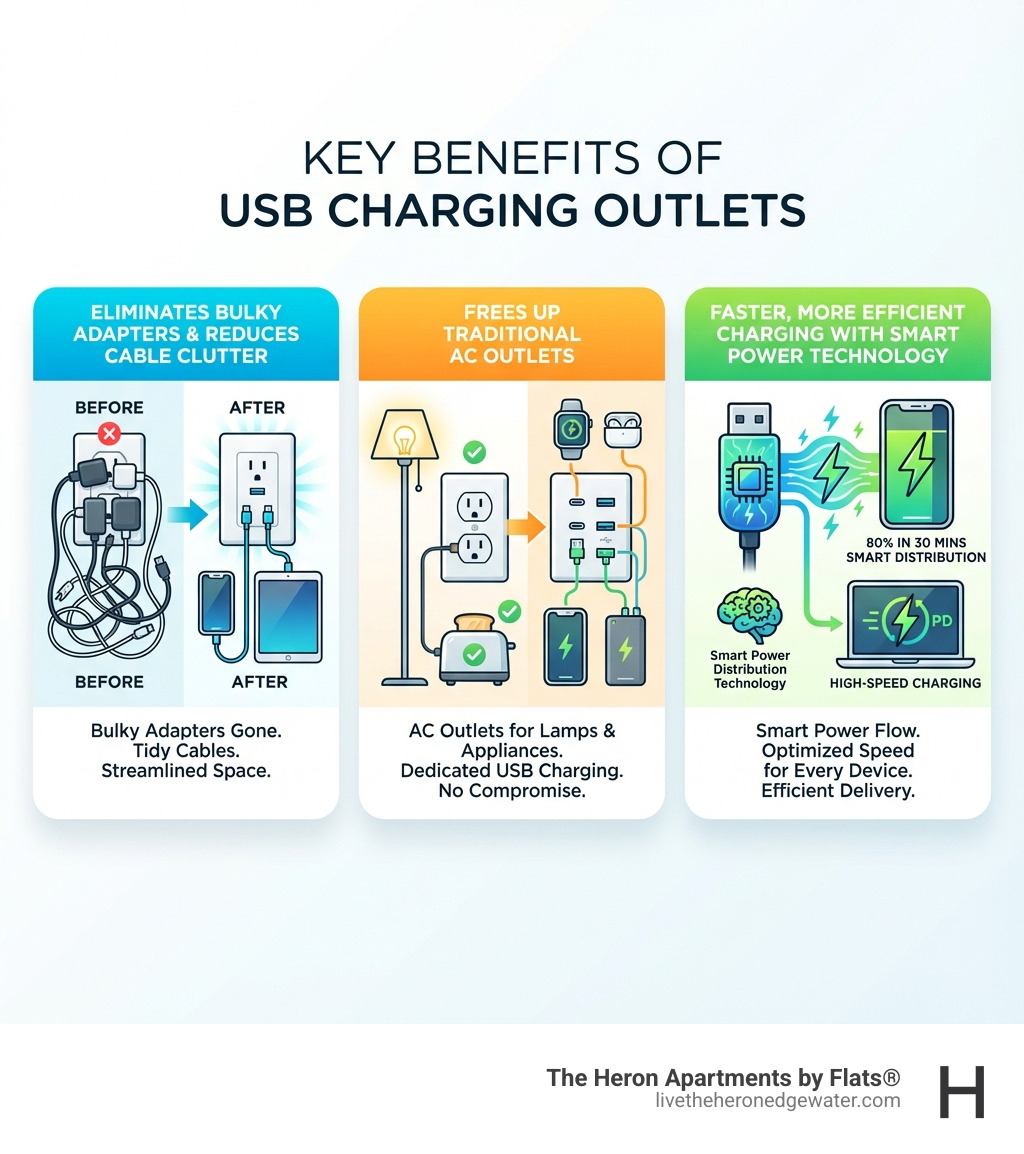
Imagine a home where tangled cords are a distant memory and every device has a dedicated, easily accessible charging spot. That's the promise of USB charging outlets, and it's a promise we find incredibly appealing for modern living spaces like ours in Edgewater, Chicago. The benefits extend far beyond mere convenience, impacting the aesthetics, functionality, and overall efficiency of our daily lives.
One of the most immediate and appreciated advantages is the dramatic reduction in clutter. Bulky power adapters for our phones, tablets, and smartwatches often monopolize traditional AC outlets, creating a messy tangle of wires and plastic bricks. With integrated USB charging outlets, these adapters become obsolete. We simply plug our USB cables directly into the wall, instantly decluttering countertops, nightstands, and desks. This streamlined approach not only looks better but also makes our spaces feel more organized and expansive.
Beyond aesthetics, these outlets offer unparalleled convenience. No more hunting for the right adapter or wrestling with a power strip overflowing with charging blocks. Whether we're in the living room, kitchen, or bedroom, a USB port is always ready. This is particularly beneficial in high-traffic areas where multiple family members or guests need to charge devices simultaneously. It prevents those friendly (or not-so-friendly) skirmishes over who gets to use the last available charging spot.
Furthermore, USB charging outlets free up our precious traditional AC outlets. In many older constructions, outlets are sparse, and every single one is valuable. By providing dedicated USB ports, we retain full access to the standard two-prong or three-prong sockets for lamps, vacuums, kitchen appliances, or whatever else needs conventional power. This maximizes the utility of our existing electrical infrastructure, making our homes more adaptable to the demands of modern technology.
The market for USB outlets is expected to grow significantly due to the increasing adoption of smart home devices and the proliferation of USB-powered gadgets. This trend highlights the growing need for integrated charging solutions that keep pace with our connected lifestyles. For those of us living in apartments with USB outlets, we experience this convenience every day. It's an upgrade that pays dividends in both practicality and peace of mind.

A Guide to the Different Types of USB Charging Outlets
When considering an upgrade to USB charging outlets, understanding the different types available is crucial. The technology has evolved rapidly, and what might have been cutting-edge a few years ago could already be superseded by faster, more efficient options. Knowing the distinctions will help us future-proof our homes and ensure compatibility with all our devices.
The market for USB charging ports is booming, reflecting the widespread need for convenient power. This growth has led to a variety of designs and capabilities, from simple USB-A ports to powerful USB-C outlets with Power Delivery.

USB-A & USB-C Combo Outlets
The most common types of USB charging outlets we see today feature a combination of USB-A and USB-C ports. USB-A, with its familiar rectangular shape, is the legacy connector. It's been around for decades and is compatible with countless older devices, from older smartphones and tablets to e-readers and fitness trackers. While slower than its newer counterpart, its widespread presence means it's still an important inclusion for universal compatibility.
USB-C, on the other hand, is the newer, more versatile standard. It's recognizable by its smaller, oval, and reversible connector, meaning there's no "wrong way" to plug it in—a small but significant convenience! The demand for USB-C ports is growing rapidly, with many new devices featuring this connector for faster charging and data transfer. USB-C offers higher power capabilities and is quickly becoming the universal standard for everything from phones to laptops.
A combo outlet, featuring both USB-A and USB-C ports, offers the best of both worlds. It ensures we can charge our older gadgets while also being ready for the latest devices. This versatility makes it an excellent choice for a household with a mix of technology, preventing the need for multiple types of outlets or adapters. It's a smart way to bridge the gap between past and future device generations.
High-Power USB-C Outlets with Power Delivery (PD)
For those of us with modern, power-hungry devices, high-power USB-C outlets featuring Power Delivery (PD) technology are a game-changer. Power Delivery is a charging technology that supplies a higher level of power than standard charging offers. It delivers faster charging to the latest PD-enabled devices and is the ideal solution for tablets, laptops, and other devices that require more power for optimal charging.
While a standard USB port might offer 5-10 watts of power, PD-enabled USB-C ports can deliver significantly more, often 30W, 45W, 60W, or even up to 77W. This increased wattage translates directly to ultra-fast charging speeds. For instance, some USB Wall Outlets with PD can bring a device to a 50% charge in as little as 25-35 minutes, depending on the specific model and device. This is a massive improvement over traditional chargers and can make a huge difference when we're in a hurry.
With PD, we can effectively charge devices that traditionally required their own bulky AC adapters, such as many laptops and larger tablets, directly from the wall. This further reduces clutter and streamlines our charging setup. When evaluating these outlets, we always look for the specified wattage (W) to ensure it meets the needs of our most demanding devices.
Specialty USB Charging Outlets
Beyond the standard USB-A and USB-C configurations, there are also specialty USB charging outlets designed for specific environments and improved safety.
One important type is the GFCI (Ground Fault Circuit Interrupter) protected USB outlet. These are essential for areas prone to moisture, such as kitchens and bathrooms. GFCI outlets are designed to quickly cut power if they detect a ground fault, preventing electric shock. Combining this vital safety feature with USB charging capability means we can safely charge our devices in these sensitive areas without compromise.
For outdoor spaces, weather-resistant USB outlets are available. These are built to withstand the elements, providing convenient charging on patios, balconies, or in garages. They are a fantastic addition for those of us who enjoy spending time outdoors and want to keep our devices powered without running extension cords from inside.
Finally, most modern USB charging outlets come with a Tamper-Resistant (TR) feature. TR receptacles have internal shutters that prevent foreign objects from being inserted into the slots, enhancing household safety. Leviton USB In-Wall Chargers, for example, are cCSAus listed and meet all National Electrical Code® requirements for tamper-resistant outlets, ensuring a high standard of safety. This feature is now a standard requirement in many building codes, including those in Chicago and throughout Illinois.
Key Features to Consider When Choosing a USB Outlet
Navigating the array of USB charging outlets can feel overwhelming, but focusing on a few key features helps us make an informed decision. Just like choosing any major home upgrade, a little research goes a long way in ensuring we pick the right solution for our needs. Wirecutter, a trusted source for product reviews, often highlights the importance of these very considerations when recommending the best wall outlets with USB charging ports.
Port Type and Charging Speed (Wattage & Amperage)
This is perhaps the most critical consideration. We need to assess our current devices and anticipate future purchases.
USB-A vs. USB-C: As we discussed, USB-A ports support older devices, while USB-C is the modern standard for faster charging and newer gadgets. Many of our current devices, especially older ones, might still use USB-A. However, new phones, tablets, and even laptops increasingly rely on USB-C. For maximum versatility, a combo outlet with both USB-A and USB-C ports is often the best choice, allowing us to charge a wider range of devices without needing adapters.
Total Power Output (Wattage & Amperage): Not all USB ports charge at the same speed. This is determined by the wattage (W) and amperage (A) output.
- Amperage (A): Older USB-A ports typically provide 1A or 2.1A. For faster charging of smartphones and smaller tablets, we look for 2.4A per port or higher. Many modern outlets offer a combined total amperage, such as 4.2A or 6.0A across multiple ports.
- Wattage (W): For USB-C ports, wattage is often the more relevant metric, especially with Power Delivery (PD). We look for 18W for fast-charging smartphones, 30W+ for tablets, and 45W-60W+ if we plan to charge laptops like a MacBook Pro directly from the wall. Some heavy-duty options even offer up to 77W.
Many USB charging outlets include a "smart charging chip." This intelligent feature detects the connected device's charging requirements and delivers the optimal current, maximizing charging speed while protecting the device from overcharging or overheating. This ensures our devices charge efficiently and safely.
Safety Certifications and Build Quality
When dealing with electrical components, safety is paramount. We always prioritize USB charging outlets that carry recognized safety certifications.
- UL Listed Certification: We look for the UL Listed mark, which indicates that the product has been tested by Underwriters Laboratories and meets stringent safety standards. This is a non-negotiable feature for any electrical product installed in our homes, ensuring it complies with safety regulations in Chicago and beyond.
- Tamper-Resistant (TR) Shutters: As mentioned, TR outlets are a crucial safety feature. These shutters prevent accidental insertion of foreign objects into the electrical slots, reducing the risk of electrical shock.
- Overcurrent Protection: Good quality USB outlets incorporate overcurrent protection, which prevents excessive current from flowing to our devices, safeguarding them from damage. Internal regulators also help prevent electronics from overheating.
- Lifespan and Durability: We want our investments to last. Reputable brands often test their USB outlets for durability. For example, Leviton USB In-Wall Chargers are tested to withstand over 10,000 insertions, ensuring a long operational lifespan.
- Warranty Information: A solid warranty, typically 1-2 years, provides peace of mind and indicates the manufacturer's confidence in their product's quality.
Smart Features for Modern Homes
The world of electrical outlets is becoming increasingly smart, and USB charging outlets are no exception. For those of us seeking to integrate our charging solutions into a connected home, smart features offer improved control and convenience.
- Smart Home Integration: Some advanced USB outlets can be integrated into broader smart home ecosystems, allowing us to control them alongside other smart devices. This could mean turning off power to the USB ports from a central app or as part of a routine.
- Voice Assistant Compatibility: Imagine telling Alexa or Google Assistant to turn off charging in the guest room. Outlets with voice assistant compatibility offer this hands-free control, making our lives a little easier.
- Remote Control Capabilities: Through a dedicated app, we might be able to remotely monitor or control the power flow to our USB ports. This is useful for energy management or simply ensuring devices aren't overcharged.
- Energy Monitoring: Some smart USB charging outlets can track energy consumption, giving us insights into how much power our devices are using. This helps us make more informed decisions about energy usage.
For those of us who appreciate modern conveniences and smart home technology, these features can lift the utility of our USB outlets beyond simple charging.
Installation and Safety: What You Need to Know
Installing a USB charging outlet is a common home improvement project, but approach it with caution and a clear understanding of electrical safety. While many USB outlets are designed to fit standard electrical boxes and wire similarly to traditional outlets, we always recommend consulting a qualified electrician, especially if you're unsure about any step of the process. Safety always comes first when working with electricity.
The good news is that most USB charging outlets are designed for straightforward replacement of existing standard wall outlets. This means they typically fit into a standard single-gang wallbox, usually measuring at least 3” x 2” x 1.5”. The wiring process generally involves connecting the hot, neutral, and ground wires, just like a conventional receptacle. However, some models might have slightly different configurations, so always refer to the manufacturer's specific instructions.
Here's a general overview of the DIY installation steps, emphasizing the critical safety measure:
- Turn off the power: This is the most crucial step. Before touching any electrical wires, always go to your home's circuit breaker panel and turn off the power to the specific outlet you'll be working on. We double-check with a non-contact voltage tester to ensure the power is indeed off.
- Remove the old outlet: Carefully unscrew the faceplate and then the outlet from the electrical box. Disconnect the wires, noting which wire (hot, neutral, ground) goes to which terminal.
- Wire the new USB outlet: Connect the corresponding wires to the new USB outlet's terminals. The black wire is usually hot, white is neutral, and bare copper or green is ground.
- Mount the new outlet: Gently push the wires back into the box and screw the new USB outlet into place. Attach the new faceplate.
- Restore power: Go back to the circuit breaker panel and turn the power back on. Test the outlet and USB ports.
While the process can be straightforward for those with electrical experience, if we're ever in doubt, calling a professional electrician is the safest and smartest option. They can ensure proper installation, adherence to local codes (which are rigorously enforced in Chicago and throughout Illinois), and overall electrical safety. You can even find helpful guides and videos, like this one on DIY projects, to give you a visual walkthrough: Video: DIY Projects with Danny Lipford.
It's also important to distinguish between a USB charging outlet and a USB charging station. A USB charging outlet is a permanent fixture installed in your wall, replacing a traditional electrical receptacle. It's integrated into your home's electrical system. A USB charging station, on the other hand, is a portable or desktop device that plugs into a standard AC outlet. It typically offers multiple USB ports and might have features like device stands or cable management. While charging stations offer flexibility, USB outlets provide a cleaner, more integrated, and permanent solution, reducing cable clutter at the source.
Safety considerations also extend to the ongoing use of USB charging outlets. We ensure that we use high-quality USB cables, as low-quality or damaged cables can compromise charging efficiency and safety. We also make sure the total power draw of our devices doesn't exceed the outlet's specified capacity, especially when charging multiple power-hungry devices simultaneously.
Frequently Asked Questions about USB Outlets
We often get asked various questions about USB charging outlets, and we're happy to provide some clarity based on our experience and the industry insights we've gathered.
Can a USB wall outlet charge a laptop?
Yes, many modern USB wall outlets can charge laptops, but there's a crucial distinction: they need to be equipped with high-power USB-C ports that support Power Delivery (PD) technology. Standard USB-A ports or lower-wattage USB-C ports will not provide enough power for most laptops.
For example, a USB charging outlet with 30W, 45W, or especially 60W (or higher) Power Delivery via a USB-C port is generally capable of charging many laptops, particularly newer models designed to charge via USB-C. We always recommend checking our laptop's power requirements (usually found on its original charger) and comparing it to the wattage output of the USB wall outlet. If your laptop requires 60W, an outlet providing 60W PD will charge it effectively. If it requires 90W, a 60W outlet might charge it slowly or not at all.
Do USB outlets use electricity when nothing is plugged in?
Yes, USB charging outlets do consume a small amount of electricity even when no devices are plugged in or charging. This is often referred to as "phantom load" or "vampire drain." The internal circuitry of the USB charger, which converts AC household current to DC USB current, requires a minimal amount of power to remain active and ready to charge.
While this standby power consumption is typically very low (often less than a watt), it's not zero. Over time, these small amounts can add up, though for a single outlet, the impact on your overall energy consumption is usually negligible. If you have many such outlets, the cumulative effect could be more noticeable. However, the convenience and decluttering benefits generally outweigh this minor power draw for most users.
Will a USB outlet fit in my existing electrical box?
In most cases, yes, a USB charging outlet will fit into your existing electrical box. Manufacturers design these outlets to be direct replacements for standard residential electrical receptacles. This means they are typically sized to fit into a standard single-gang wallbox.
However, there are a couple of considerations:
- Box Depth: While the width and height are usually standard, some older or shallower electrical boxes might be a tight squeeze for certain USB outlets, which can be slightly deeper than traditional outlets due to the integrated charging components. We always check the depth of our existing box and compare it to the new outlet's specifications.
- Wiring Space: The addition of the USB charging module means there might be less space inside the electrical box for wires. If your box is already crowded with multiple wires (e.g., if it's part of a multi-gang setup or a junction point), it might be more challenging to fit the new outlet.
For those in Edgewater, Chicago, and throughout Illinois, electrical boxes typically adhere to modern standards, making compatibility quite high. If you encounter any difficulties or have concerns about space, we highly recommend consulting a licensed electrician. They can assess your specific situation and ensure a safe and proper installation.
Conclusion
Upgrading to USB charging outlets is more than just a fleeting trend; it's a practical and forward-thinking improvement for any modern home. As our lives become increasingly tethered to portable devices, the need for efficient, accessible, and clutter-free charging solutions grows exponentially. The statistics clearly show a booming market, driven by the sheer convenience and functionality these outlets provide.
We've explored the myriad benefits, from decluttering our living spaces and freeing up valuable AC outlets to enjoying faster, more efficient charging for all our gadgets. We've also digd into the different types, from versatile USB-A and USB-C combo ports to powerful Power Delivery options capable of charging laptops, and specialized outlets designed for safety in kitchens, bathrooms, and even outdoors.
Choosing the right USB charging outlet involves considering port types, wattage, amperage, and crucial safety certifications like UL Listing and tamper-resistant features. And for those of us embracing smart home technology, integrated smart features offer an added layer of control and convenience. While installation can be a DIY project for the electrically inclined, we always advocate for professional assistance if there's any doubt, ensuring safety and compliance with local codes in Chicago and beyond.
Installing USB charging outlets is a worthwhile investment. It simplifies our daily routines, improves the aesthetic appeal of our homes by minimizing cable clutter, and ensures our spaces are equipped for the technological demands of today and tomorrow. This commitment to modern amenities and thoughtful design is something we deeply value, aligning perfectly with the sophisticated living experience we offer at The Heron Apartments.
Ready to experience a home where modern convenience is built into every detail? Explore our exceptional amenities and find how The Heron delivers a truly liftd living experience in Chicago: Chicago apartments with best amenities Explore our modern amenities